




















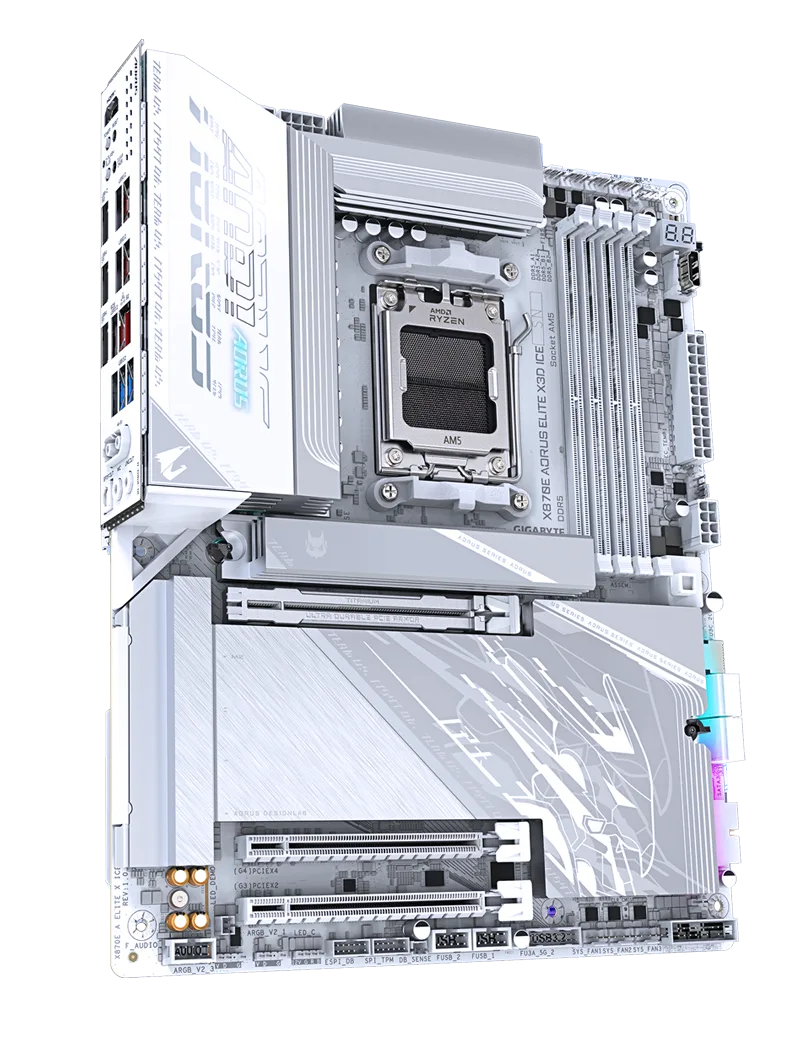
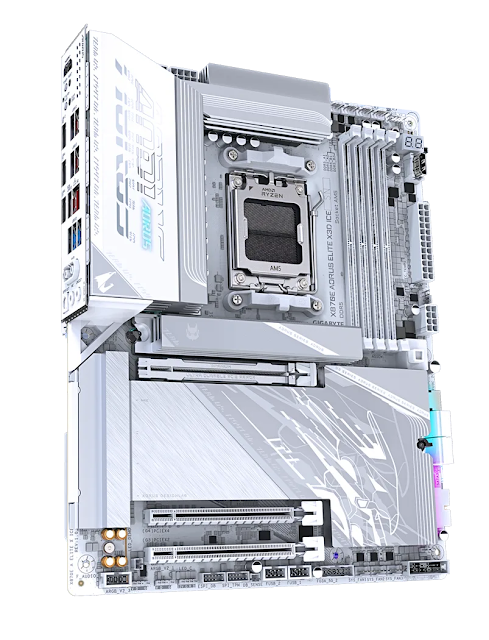
If you’re putting together a high-performance AMD build right now, the Gigabyte X870E AORUS ELITE X3D ICE deserves a serious look. I’ve been spending time with this board, and it’s one of the more well-rounded options in the current AM5 lineup — especially if you’re drawn to a clean white aesthetic without wanting to sacrifice on specs or features.
Design and First Impressions
The ICE variant lives up to its name. The entire board is dressed in white with silver accents, and it looks genuinely premium out of the box. If you’re building a bright-themed or all-white PC, this is one of the few motherboards that actually commits to the look rather than just slapping a white heatsink on an otherwise dark PCB.
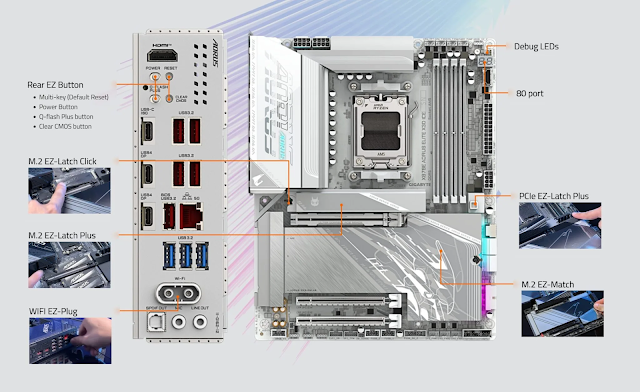
Beyond the aesthetics, the physical layout is thoughtful. Connectors are placed exactly where you’d expect them, cable management is easy, and the EZ-Latch system means no screws are needed for any of the four M.2 slots — including the main PCIe x16 slot retention. The mono-heatsink covering three M.2 sockets and the chipset is a smart design choice that simplifies installation compared to earlier-generation boards.
The backplate — something previously reserved for Gigabyte’s highest-end models — makes a return here, adding structural rigidity and helping with rear-side thermal management. It’s a welcome addition.
Specs That Matter
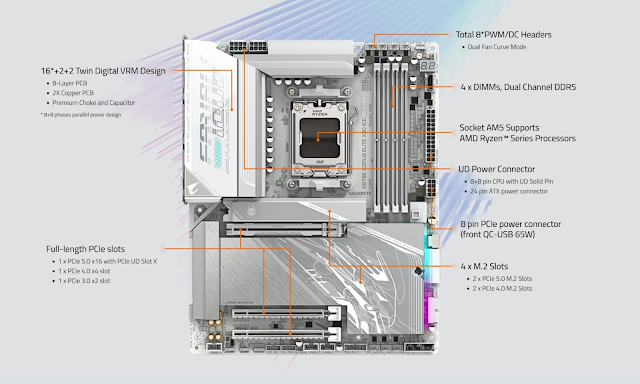
The X870E ELITE X3D ICE sits on AMD’s flagship X870E chipset, supporting all AM5 processors from the Ryzen 7000, 8000, and 9000 series. The power delivery uses a 16+2+2 phase VRM design (16 phases dedicated to the CPU), which is more than sufficient for even the most demanding Ryzen processors under full load or overclocking.
Memory support goes up to DDR5 9000 MT/s with overclocking, across four DIMM slots with a maximum capacity of 256GB. For gaming, the sweet spot remains two sticks at higher speeds — the board handles DDR5-6400 CL32 effortlessly, and pushing to 6600 MT/s is achievable with the right modules.
Storage is covered by four M.2 slots — two running at PCIe 5.0 x4 and two at PCIe 4.0 x4 — alongside four SATA 6Gb/s ports. The PCIe 5.0 M.2 slot delivered sequential read speeds of around 14.4 GB/s in testing with a compatible NVMe drive, which is exactly what you’d expect from a Gen 5 connection.
Connectivity
This is where the X870E ELITE X3D ICE really stands out. The rear I/O is packed:
- Dual USB4 Type-C ports (40 Gbps each, with DisplayPort Alt Mode)
- 5 x USB 3.2 Gen 2 Type-A ports
- 3 x USB 3.2 Gen 1 ports
- 5GbE LAN (Realtek)
- Wi-Fi 7 with Bluetooth 5.4 (Qualcomm QCNCM865, supporting 2.4/5/6 GHz)
- HDMI 2.1 output
- Power, Reset, Clear CMOS, and Q-Flash Plus buttons — all on the rear panel
The front panel USB-C header supports 65W PD 3.0 / QC 4+ fast charging, which is a genuinely useful feature for charging devices directly from the case front. USB4 real-world speeds hit close to 3.6 GB/s in testing, which is near the practical ceiling for current USB4 storage devices.
The Wi-Fi antenna uses Gigabyte’s EZ-Plug design — no threading nuts, just a simple plug-in connector. Small detail, but it makes a difference during builds.
Performance
Across CPU, memory, and productivity benchmarks, the X870E ELITE X3D ICE consistently performed at or near the top of the AM5 comparison stack. Memory bandwidth and latency results were notably strong even at default settings, with Gigabyte’s BIOS optimizations providing a measurable edge over some competing boards. In real-world application tests using PCMark 10, it led the AM5 field in several categories.
Gaming performance was competitive with all other high-end AM5 boards, as expected — the differences at this level are within margin of error and won’t translate to any noticeable real-world gap.
Power consumption came in slightly lower than comparable boards under the same workloads, which is a minor but consistent win.
X3D Turbo Mode 2.0 and Overclocking
The headline software feature is X3D Turbo Mode 2.0, which uses an onboard AI model to dynamically optimize Ryzen X3D processor parameters in real time. Gigabyte claims up to 25% performance uplift in supported games with a single click — results vary by title, but the feature is genuinely effective and easy to enable.
For overclocking, the BIOS offers manual, PBO, and mixed-mode options alongside Gigabyte’s AI performance presets for gaming or general workloads. Memory overclocking is well-supported, with stable operation at DDR5-6400 CL32 on 2×48GB sticks and the ability to push single-rank modules to 8400 MT/s and beyond. The 512Mbit BIOS chip is a forward-looking choice, ensuring the board has enough capacity to support both current and future AM5 CPUs without compromise.
BIOS and Software
The updated UC BIOS 2.0 is a genuine improvement. It’s cleaner, faster to navigate, and includes a quick search function that eliminates the need to dig through menus. Other useful additions include one-click screenshots, quick access to nine key Advanced Mode settings directly from Easy Mode, and real-time thermal monitoring during POST before Windows even loads.
The Gigabyte Control Center software brings RGB control, fan management, overclocking presets, and a new SSD diagnostic tool into one interface. Fan control worked without issues across all headers, and RGB compatibility extended to popular brands including G.Skill and Kingston.
Final Thoughts
The Gigabyte X870E AORUS ELITE X3D ICE is priced at around $369.99, which puts it in a competitive but not cheap bracket. That said, the value proposition is strong — you’re getting flagship-tier connectivity, a robust power delivery system, excellent thermal management, four M.2 slots, Wi-Fi 7, USB4, and a genuinely refined user experience, all in a board that’s also easy to build with.
If you’re building or upgrading an AM5 system and want something that covers all the bases without needing to step up to a $500+ flagship, this is a very compelling option. It’s fast, well-built, and designed to last through the full lifespan of the AM5 platform.